Thursday, April 9, 2026

Autodest Fusion - Better than Revit?

It has been a while since I last posted here.


Although I have never discussed software other than Revit on this blog, today I would like to talk about Fusion.


Since becoming a member of Autodesk’s Expert Elites program, I have had the opportunity to try out various Autodesk products. One of them was Fusion. As someone with a strong interest in parametric design, Fusion was a very interesting piece of software for me.


Because Revit deals with architecture, it is not suitable for designing very small objects. Fusion, however, allows for the precise design of even very small objects and offers excellent parametric capabilities.


By utilizing dimensional constraints, parameters, and modifications via the timeline, even very complex shapes can be easily created and modified. It also provides various features to enable accurate predictions when hinges or assemblies are required.


I have been using a 3D printer for my architectural design work for several years now. Since I started using Fusion, my 3D printer spends more time printing various objects I have designed than printing buildings.


Recently, I created a unique device using Fusion. This device functions as a joystick by simply attaching it to a mechanical keyboard.


The device is designed to press a switch based on the direction of the lever's movement, and by utilizing Fusion, I was able to predict all movements and perform an accurate design.

If you are interested in designing small objects other than buildings, please give Fusion a try.

Fusion is better than Revit, unless it is for buildings. :)

You can print above model for free If you have a 3d printer

(FunOrNothing is the name I use in the 3D printing community.)

Sunday, September 18, 2022

10'th Anniversary of EnjoyRevit

 This was my first YouTube vidoe of mine in 2012.


After a year, I posted my first article of EnjoyRevit here to share my experiences and knowledge with Revit users in the world. (I have had my Korean Blog already)

Now, it's 2022 and have been 10years after my first video.

Monday, January 24, 2022

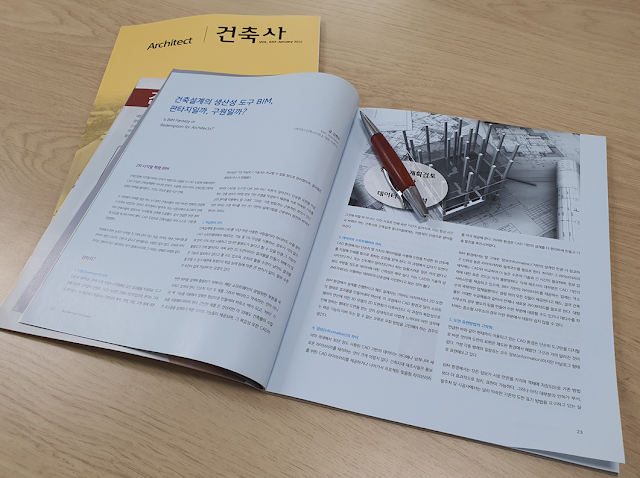
BIM as a Design Tool for Architects, Is it Fantasy or Salvation?

The 2nd Digital Revolution, BIM


The first use of the word ‘digital’ in the building industry was with the introduction of CAD.
The introduction of CAD brought about great change not only for architectural design, but also overall construction industry which includes aproval and construction. And in an extremely short time.
What is noteworthy in this process is that architects has become the protagonist, more than anyone like the permit holder, the ordering party, or the contractors
Architects have already taken the lead in introducing ‘digital’ into architecture, and the aforementioned related fields, and even urged to introduce for them. With the introduction of CAD, architects have already experienced salvation by themselves.
More than a decade have passed since the BIM discussion began in Korea, most of architects regard it as fantasy rather than salvation. And the reason as follow.

This is my contribution for the magazine 'Architects' Jan.2022 which was published by KIRA (Korea Institute of Resistered Architects)

Wednesday, August 11, 2021

Geometrical Construction in Dynamo

    Recently I've been asked about how to make a Tetra-Pod with Dynamo. After I created one, I felt it's a quite simple but good example of using geometrical construction in Dynamo, so I'm posting about it.


    Basically, the geometry of a Tetra-Pod is from a regular tetrahedron as it's name. So if a regular tetrahedron could be created, making a Tetra-Pod wouldn't be very difficult.

Friday, August 6, 2021

Unfolding Curtain Walls for Documents

    One of the advantages of using Revit is in making documents. Revit makes it easy for me to create plans, elevations, legends or schedules. But some of elements in Revit models are quite tricky to make it's documents.

    Curtain Wall is one of them. It's harder especially when it has curved location line. In Autocad environments, I've naturally drawn a planar for it's documents, but in Revit, I had to use 3d views, assembly or other ways to explain it through documents.

    I know there are several Dynamo solutions for unfolding. But I couldn't find a great one for creating construction documents from any of them. So, I created my own dyn for the job.


1. Approach

    From a selected Curtain Wall , you can get Panels or Mullions. 

Sunday, July 25, 2021

How to Speedup Your Dynamo

    When ever I create a Dynamo graph, what I do at the end is reviewing the graph (or python code) and ask myself whether it is the fastest flow. (Yes, I'm a Korean. Click if you want to learn a Korean word pali-pali)


There would be a lot of situations though, there are some representative ways to speedup Dynamo.


1. Use Numbers rather than Geometries as possible.

figure#1. Geometry.Translate

Wednesday, July 21, 2021

What is Vector.AlmostEqualTo and Vector.IsParallel?

 Vector is one of the most important factors when you manipulate geometries with Dynamo.


If so, Here is a question.

What will these two return???